
MACD with a zero-line filter
The usual crossing of MACD and its signal line, but a trade opens only on the side of the zero line where the trend is: above zero for buys, below it for sells. Counter-trend signals are skipped.
Choose a platform: MT5 shows the chart and Inputs screenshots from MetaTrader 5, MT4 shows the chart with entries and the Inputs screenshot from MetaTrader 4.
How the robot trades
When it buys
MACD crosses its signal line upward above zero.
When it sells
MACD crosses its signal line downward below zero.
When it exits
The opposite crossing of MACD and its signal line.
Screenshot 1 of 5
The conditions as constructor blocks
Open a buy
Open a sell
Close a buy
Close a sell
Inputs
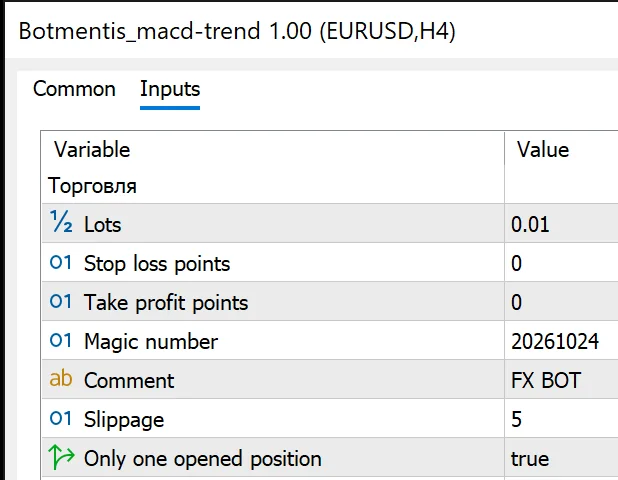
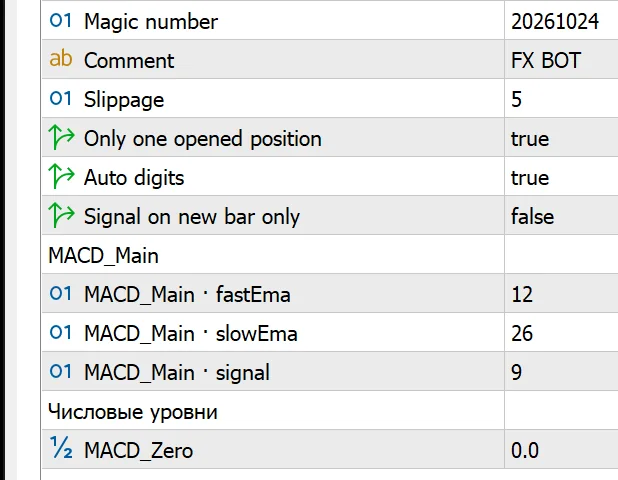
These inputs appear in the expert advisor settings in MetaTrader 5 or MetaTrader 4, and they are what the strategy tester goes through when it optimises the robot.
| Input | Default | What it means |
|---|---|---|
| InpMACD_Main_fastEma | 12 | Fast MACD period: how many recent candles the fast line averages. |
| InpMACD_Main_slowEma | 26 | Slow MACD period: the larger it is, the calmer the line and the rarer the signals. |
| InpMACD_Main_signal | 9 | Signal line period: the smoothing of the main MACD line. |
| MACD_Zero | 0 | The zero level: above it the trend counts as upward, below it as downward. Zero by default. |
How to tune the robot to your style
- Change the 12/26/9 periods and watch how the number of signals changes.
- Put a small threshold instead of zero — signals right at the zero line will stop opening trades.
- Compare it with the MACD and signal line robot: the same entry, but without the trend filter.
You can do all of this in the constructor without signing up. To save your changes and come back to them later, you need an account.
Risks
How a strategy behaved in the past does not predict its future results. Check the robot in the strategy tester and on a demo account first, and only then decide whether to trade it with real money. This robot is an example to adapt to your instrument, timeframe and risk rules.